- About this manual
- Login
- Menu
-
File list
- File list
- Upload files
-
File Distribution
- About Email text
- About security settings
- Send from own mailer
- Email to Receiving (collecting) and distribution
- About Email text of the Email to collect and distribute
- About security settings of the Email to collect files and distribute files
- Notification of file and collection Email send from own mailer
- Check on how many people the file was sent
- Group sharing folder function
- Folder publication
- Display thumbnail image function
- Receive (collect)
- Mail standby
- Address book
- Approval list(※Option)
- History
- Settings
- Profile
- Support
- Help
- Download files
- Upload files
Upload files
When you get an Email that is inform you to collect files, you can upload your files to the system on the web, and the files are sent to the sender of the Email.
(→Receive (collect))
The ordinary upload
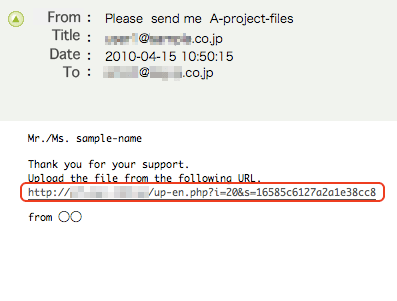
Please upload files with the URL that is written in the Email that is inform you to collect files.
First, please access to the URL written in the Email to upload files.
Please upload files in the upload screen.
Please click「Brows…」button and select the files you want to upload, and click [Upload] button. It is completed to upload files.
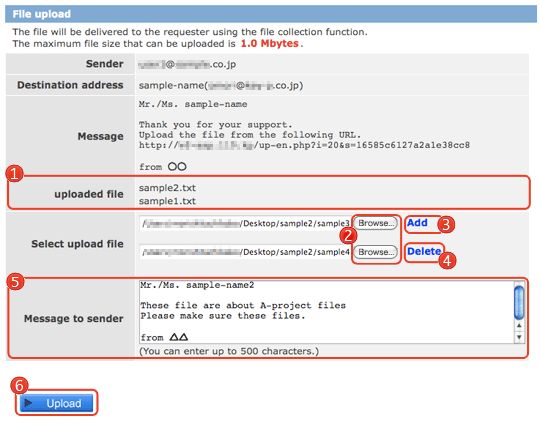
 uploaded file uploaded file |
If there are some files already uploaded, the names are displayed. |
|---|---|
 [Browse] [Browse] |
You can select the file you want to upload. |
 Add Add |
You can add files to upload. |
 Delete Delete |
You can delete file name that is prepared for upload. |
 Message to sender Message to sender |
You can send message to the sender at the same time to upload files. |
 [Upload] [Upload] |
Complete to upload files. |