- About this manual
- Login
- Menu
-
File list
- File list
- Upload files
-
File Distribution
- About Email text
- About security settings
- Send from own mailer
- Email to Receiving (collecting) and distribution
- About Email text of the Email to collect and distribute
- About security settings of the Email to collect files and distribute files
- Notification of file and collection Email send from own mailer
- Check on how many people the file was sent
- Group sharing folder function
- Folder publication
- Display thumbnail image function
- Receive (collect)
- Mail standby
- Address book
- Approval list(※Option)
- History
- Settings
- Profile
- Support
- Help
- Download files
- Upload files
Download files
Download with the one-time password
One-time password is a kind of password that can be use 1 time and after that the same password is not available. You can get the one-time password and download the files with the password.
You have to get the password every time you want to download. You can get the password with Email.
Please enter the Email address that is the original of receive the Email with URL to download files.
If you enter the Email address that is different address of the original receiver or the address that is forwarded for not the original, it is impossible to get the one-time password. If you receive the forwarded Email, please enter the address of the original receiver.
If the Email was received “○○@sample.co.jp” first, and Ms. / Mr. Green forwards this Email to you as “▲▲@mailaddress.com.” In this case, you enter “○○@sample.co.jp “ to get one-time password.
[Notice]
Click the “Redo from beginning” button, you can redo from to get one-time passoward.
After you enter the password, please click [Password acquisition] button.
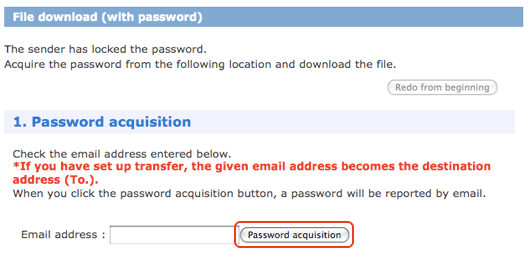
- In case that the Email address is correct
-
The one-time password is sent to the address that you entered, and the screen to enter the password is open.
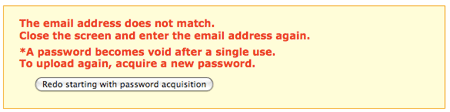
- In case that the Email address is incorrect
-
The error message is displayed and the screen to enter the password is not open.

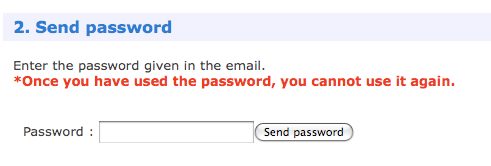
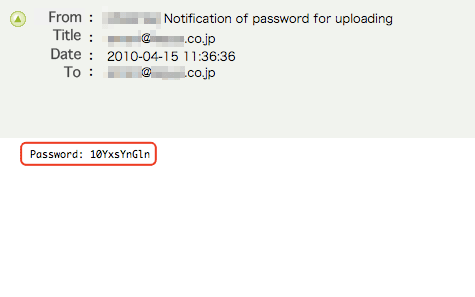
When the address that you enter is correct, the password is sent by Email “Notification of password for downloading.” Please enter the password which is given in the password, and click the [Send password] button.
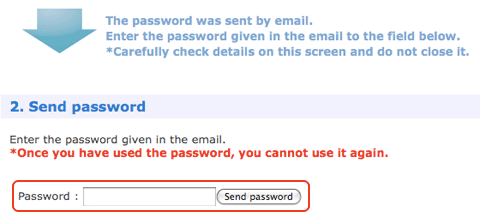
- In case that the password is correct
- The download files screen is opened.
Please click the at the right side of the file that you want to download. File downloading will start.
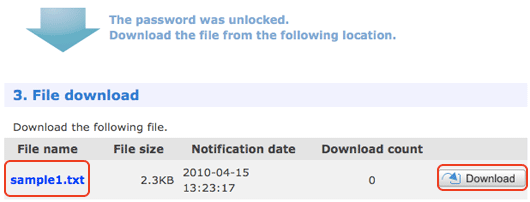
- In case that the password is not correct
- The error message is displayed and the screen to download files is not open.
Click [Redo from beginning] button, you can redo from getting one-time password.