- About this manual
- Login
- Menu
-
File list
- File list
- Upload files
-
File Distribution
- About Email text
- About security settings
- Send from own mailer
- Email to Receiving (collecting) and distribution
- About Email text of the Email to collect and distribute
- About security settings of the Email to collect files and distribute files
- Notification of file and collection Email send from own mailer
- Check on how many people the file was sent
- Group sharing folder function
- Folder publication
- Display thumbnail image function
- Receive (collect)
- Mail standby
- Address book
- Approval list(※Option)
- History
- Settings
- Profile
- Support
- Help
- Download files
- Upload files
Profile
You can see your profile registered in the system. You can change your password here.
We advise that you change your password periodically.
Please click menu:profile.

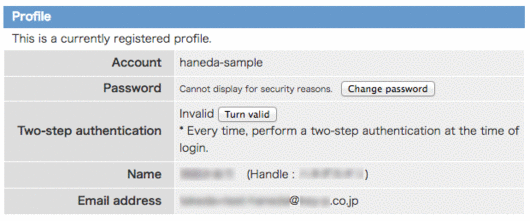
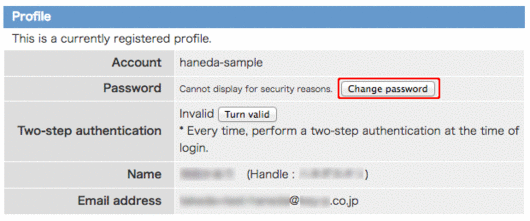
Change password
You can change password. Please click [Change password] button.
Change password screen will appear.
Please enter current password, new password, and new password to confirm, and click [Submit] button.
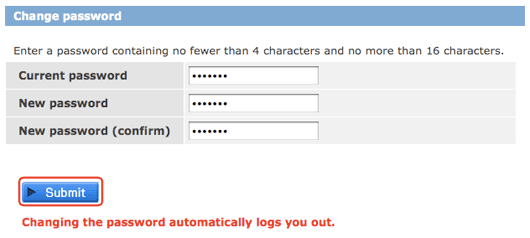
When you change your password, it automatically logs you out.
Please log in with your new password.
Two-step authentication
Two-step authentication turn valid
In the state of invalid, [Turn valid] is displayed on the profile and clikc the button.
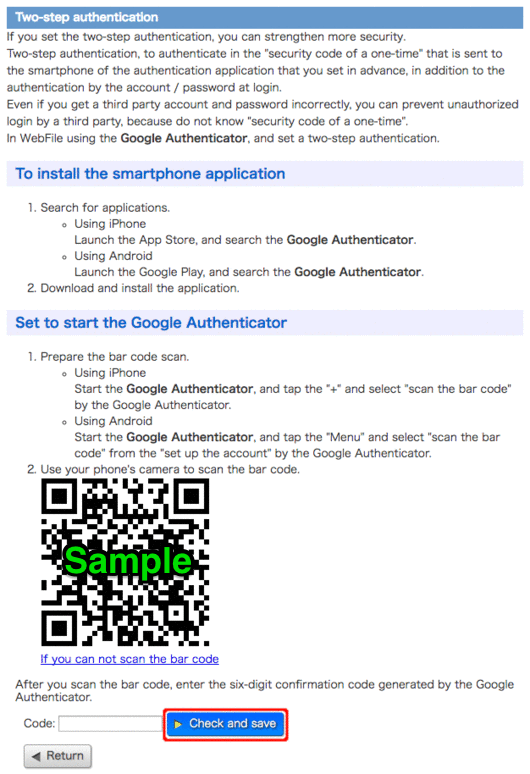
Prepare a two-step authentication along the description. Enter the confirmation code, please click [Check and save].
Two-step authentication turn invalid
In the state of valid, [Turn invalid] is displayed on the profile and click the button.
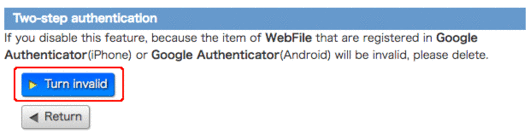
Please click the [Turn invalid] from reading the description.