- About this manual
- Login
- Menu
-
File list
- File list
- Upload files
-
File Distribution
- About Email text
- About security settings
- Send from own mailer
- Email to Receiving (collecting) and distribution
- About Email text of the Email to collect and distribute
- About security settings of the Email to collect files and distribute files
- Notification of file and collection Email send from own mailer
- Check on how many people the file was sent
- Group sharing folder function
- Folder publication
- Display thumbnail image function
- Receive (collect)
- Mail standby
- Address book
- Approval list(※Option)
- History
- Settings
- Profile
- Support
- Help
- Download files
- Upload files
Approval list(※Option)
Approval list is an option.
Approval list and this function is that: when you send Email to inform file distribution,, distribution and collection at the same time, folder publication, if your leader or superior approve your Email, the Email will be sent. If your leader or superior reject your operation, the Email will not be sent. If you send Email from your own mailer (file distribution from your own mailer or folder publication from your own mailer), only the URL that is approved by your leader or superior is valid.
Please click “Menu: Approval list”.

Approval list for the user
Approval list of the user
In approval list, you can see the list of Emails to inform your distribution that is waiting for approving by your leader, or see the list of Emails already approved or rejected.
The list of Email waiting for approving is below.
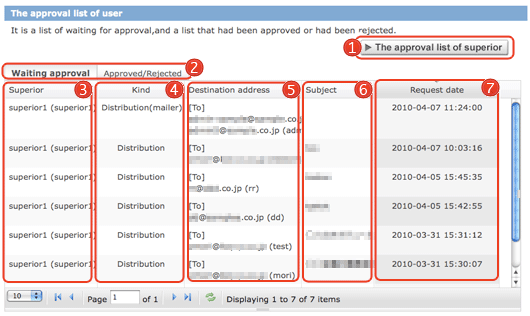
 [The approval list of superior] [The approval list of superior] |
If you are the superior of someone, this button appears. Click this button, you can see the list for superior.(→The approval list for superior) |
|---|---|
  |
You can change the list of Email waiting for approval or list of Email approved or rejected Email. |
 Superior Superior |
This is your superior whom you select when you sent Email. |
 Kind Kind |
This is a kind of how to send your notification. |
 Destination address Destination address |
This is a destination address of Email. |
 Subject Subject |
This is a subject of Email. (If you sent Email from your own mailer, this subject will not be displayed here.) |
 Request date Request date |
This is a request date to approve Email for your leader or superior. |
The Approved/Rejected list is below.
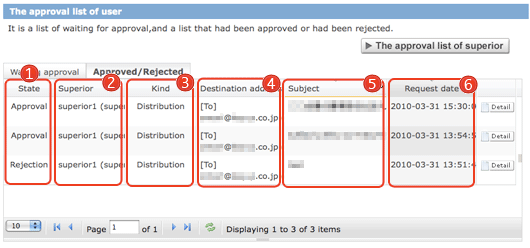
| State |
This is a state of Email that is approved or rejected. |
|---|---|
| Superior |
This is your leader or superior that when you send your Email to inform, you selected. |
| Kind |
This is a kind of how to send your notification. |
| Destination address |
This is a destination address of Email. |
| Subject |
This is a subject of Email. (If you sent Email from your own mailer, this subject will not be displayed here.) |
| Request date |
This is a request date to approve Email for your leader or superior. |
 |
When you click this button, details of the Email will appear.(→Waiting approval・Approved/Rejected details screen) |
| The items for displaying list | |
|---|---|
 |
Set how many rows are displayed in a page. |
 |
Move to the first page. |
 |
Move to the previous page. |
 |
Move to the page you enter. |
 |
Move to the next page. |
 |
Move to the last page. |
 |
Update the list. |
Approve and reject by the superior
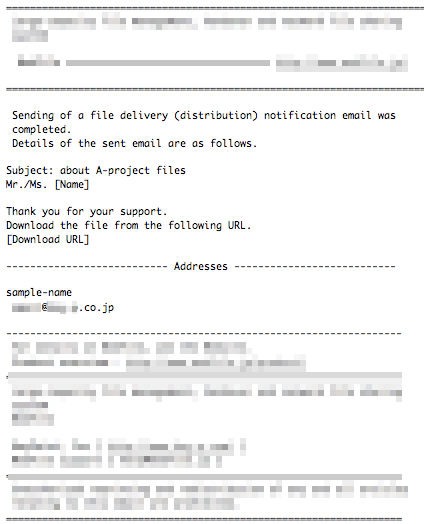
The Email to inform that is waiting for approving by the superior will be sent when the superior approve the Email.
When the superior approve the Email, the system inform you about that.
- The Email that the superior approves.
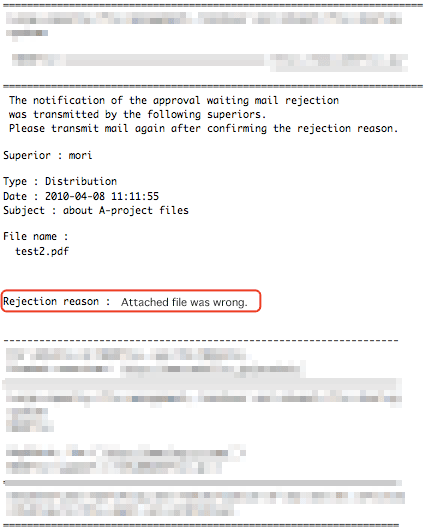
If the superior reject your Email to inform file destination, the Email will not be sent.
And, when your Email is rejected, the system will send you Email to inform you that the Email was rejected and was not sent.
In the Email, the reason why the Email was rejected, please read the massage.
- The Email that the superior reject
Approval list for the superior
Approval list of the superior
If you are the superior of someone, you can see the Email that is waiting for the approving by you, and the Email that was approved or rejected.
The list of Email waiting for approving is below.
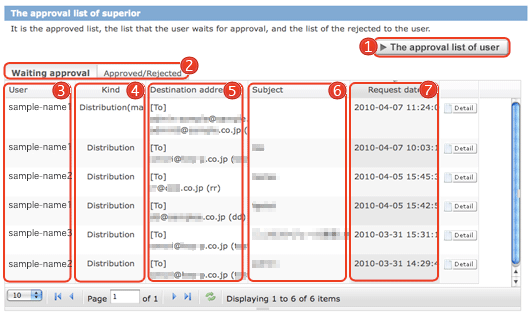
| [The approval list of user] |
If you are the superior of someone, this button appears. Click this button, you can see the list for superior.(→Approval list of the user) |
|---|---|
|
You can change the list of Email waiting for approval or list of Email approved or rejected Email. |
| User who waits to approve by the superior |
User who waits to approve by the superior. |
| Kind |
This is a kind of how to send your notification. |
| Destination address |
This is a destination address of Email. |
| Subject |
This is a subject of Email. (If you sent Email from your own mailer, this subject will not be displayed here.) |
| Request date |
This is a request date to approve Email for your leader or superior. |
|
You can see the details of the Email that waits for approving. (→Waiting approval・Approved/Rejected details screen) |
The Approved/Rejected list is below.
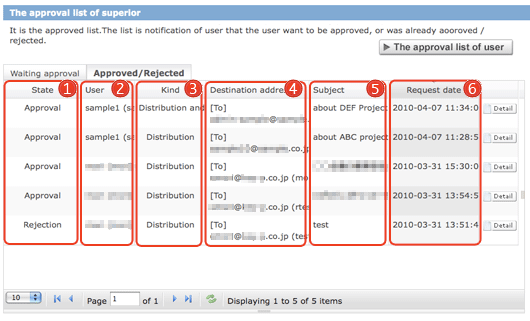
| State |
This is a state of Email that is approved or rejected. |
|---|---|
| User |
User waits for approving. |
| Kind |
This is a kind of how to send your notification. |
| Destination address |
This is a destination address of Email. |
| Subject |
This is a subject of Email. (If you sent Email from your own mailer, this subject will not be displayed here.) |
| Request date |
This is a request date to approve Email for your leader or superior. |
 |
When you click this button, details of the Email will appear. (→Waiting approval・Approved/Rejected details screen) |
Waiting approval・Approved/Rejected details screen
In waiting approval screen, you can see details about Email to inform distribution. In the detail screen of Email waits for approving, you can approve or reject the Email.
In the detail screen of Email that was approved or rejected, you can see the details of Email already handled.
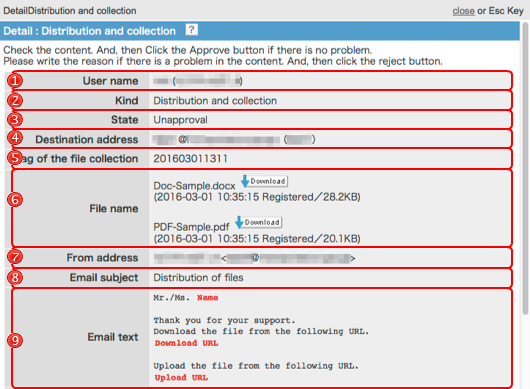
| User name |
User who waits for approving by the user. |
|---|---|
| Kind |
This is a kind of how to send your notification. |
| State |
This is a state of Email that is approved or rejected.You can see whether the Email is un-approving or approved/rejected. |
| Destination address |
This is a destination address of Email. If the destination address of Email is prohibited by domain limited after registration, address of Email is displayed in red. 
|
| Tag of the file collection |
You can manage the Email to collect files with tags. It appears receipt when only. |
| File name |
The file distributed and the files in the publication folder. You can download file,as you click the [dawnload] button. |
| From address |
Notification is the e-mail sender. If the sender setting function is disabled it will not be displayed. |
 Email subject Email subject |
This is a subject of Email. (If you sent Email from your own mailer, this subject will not be displayed here.) |
 Email text Email text |
This is a text of Email. (If you sent Email from your own mailer, this text will not be displayed here.) |
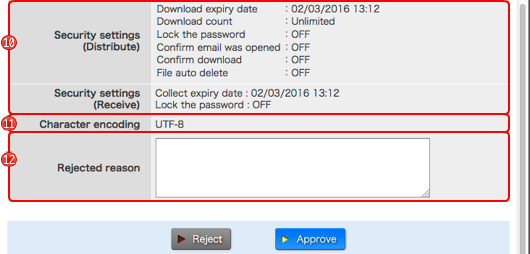
 Security settings Security settings |
They are security settings about this Email. |
 Character encoding Character encoding |
It is set-up character encoding of e-mail. |
 Reason rejected Reason rejected(only rejected) |
This is a reason why the Email will be rejected. This reason will be sent to the sender of this Email. |
If you want to reject the Email, please enter the reason why this Email is rejected and click the [Reject] button. If you want to approve the Email, please click the [Approve] button. After that handling, the system send a Email to the sender of this Email and inform the result of this handle.